Administration
Everyday accounting, with the numbers that matter always in view.
- Sales and purchase invoices via SDI
- Banking, payment deadlines and reminders
- VAT, profit and loss, your accountant
Accounting and HR for SMEs in Italy
E-invoicing through SDI, Italy's e-invoicing exchange system, plus banking, payment deadlines, VAT and profit and loss by cost centre. Attendance, leave, expense claims and payroll data. Nixsa Conti keeps day-to-day administration in order and hands your accountant and payroll consultant data that has already been checked.
Open-access demo, no sign-up needed: three ready-made profiles and a fictional company at work.
Three logins, one set of data
Each role sees only what it needs. Whatever an employee does in the app reaches the office straight away; whatever the office approves goes straight back to their phone.
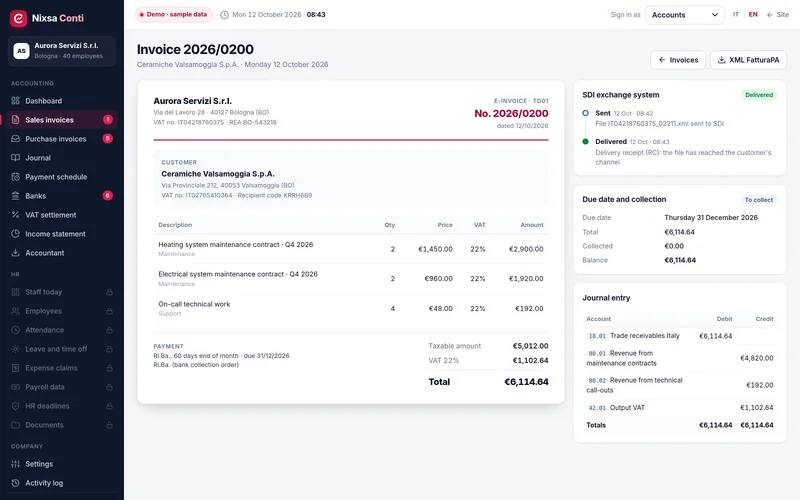
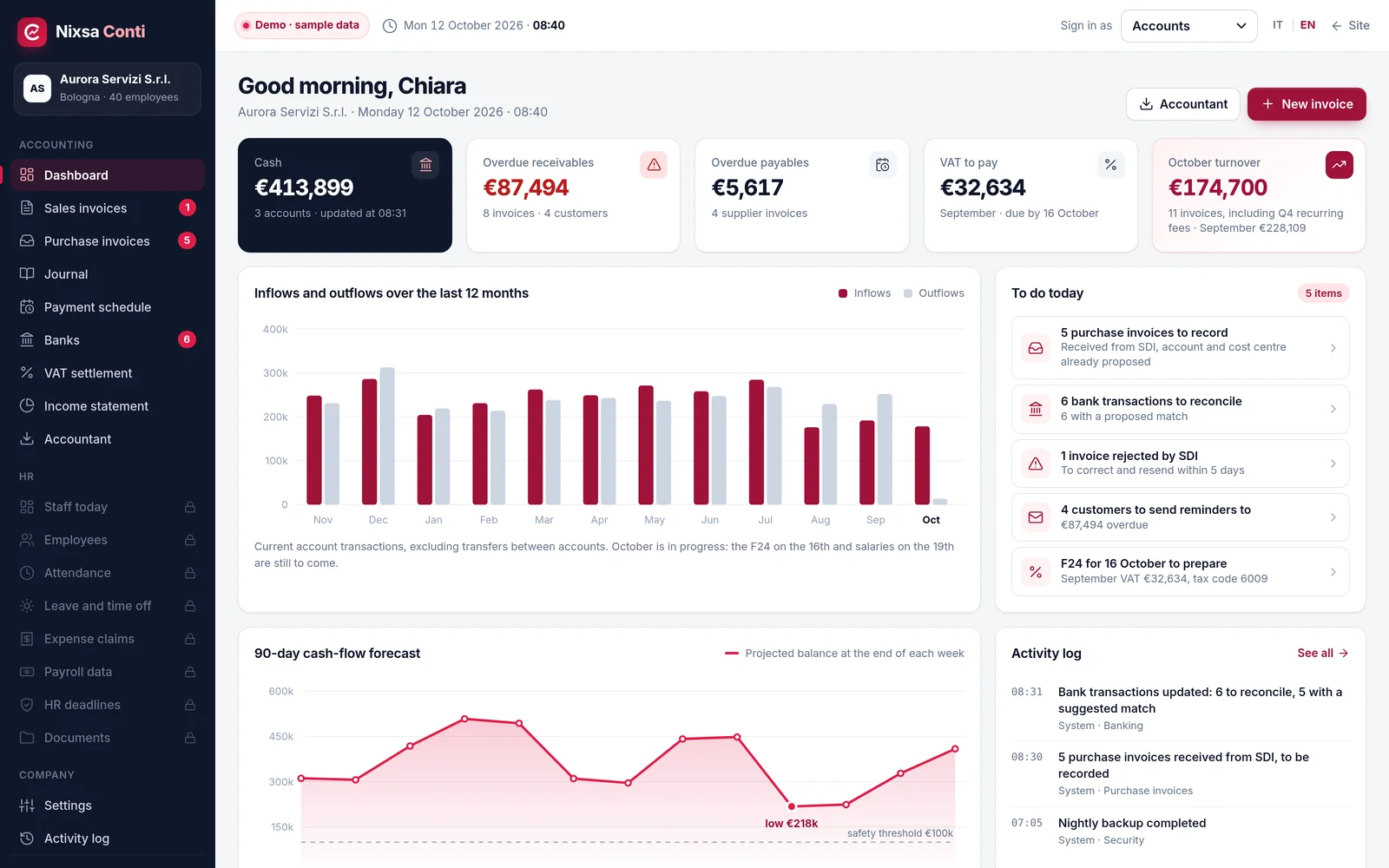
Everyday accounting, with the numbers that matter always in view.
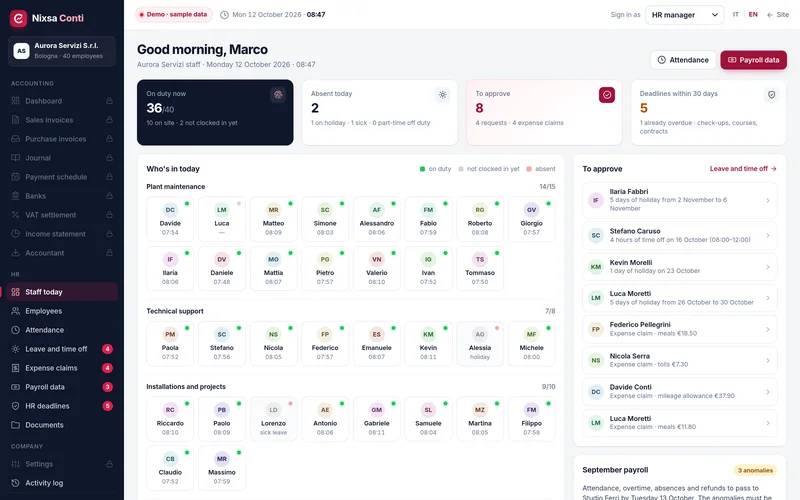
Everyone's attendance, absences and deadlines, and the month ready for your payroll consultant.
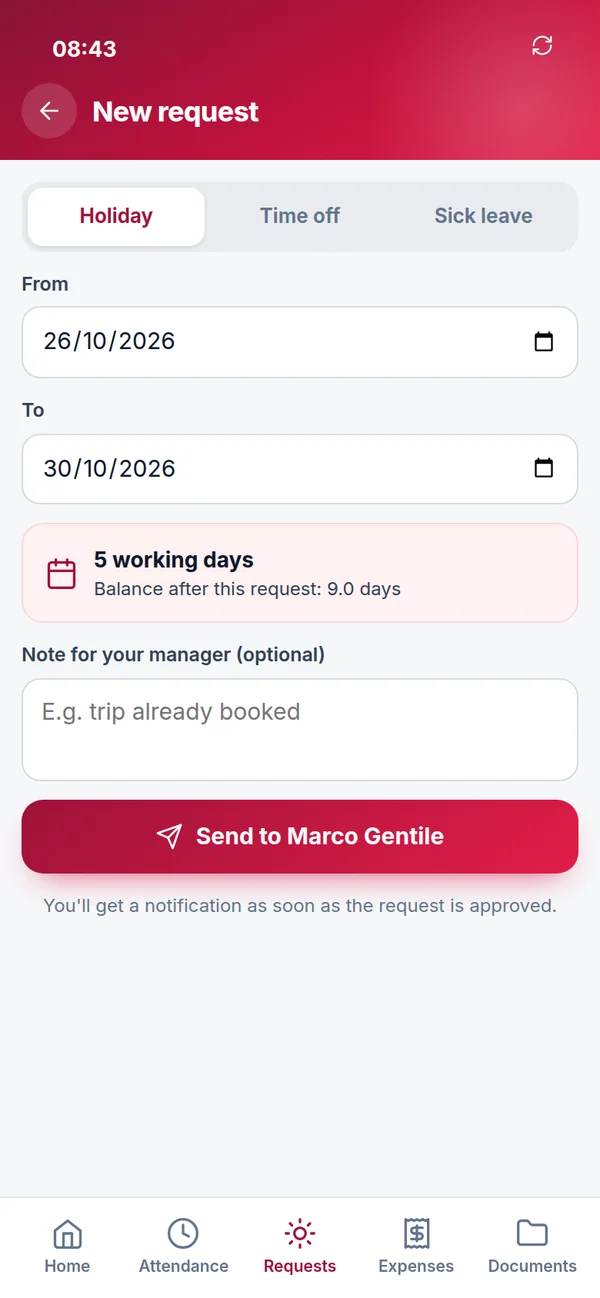
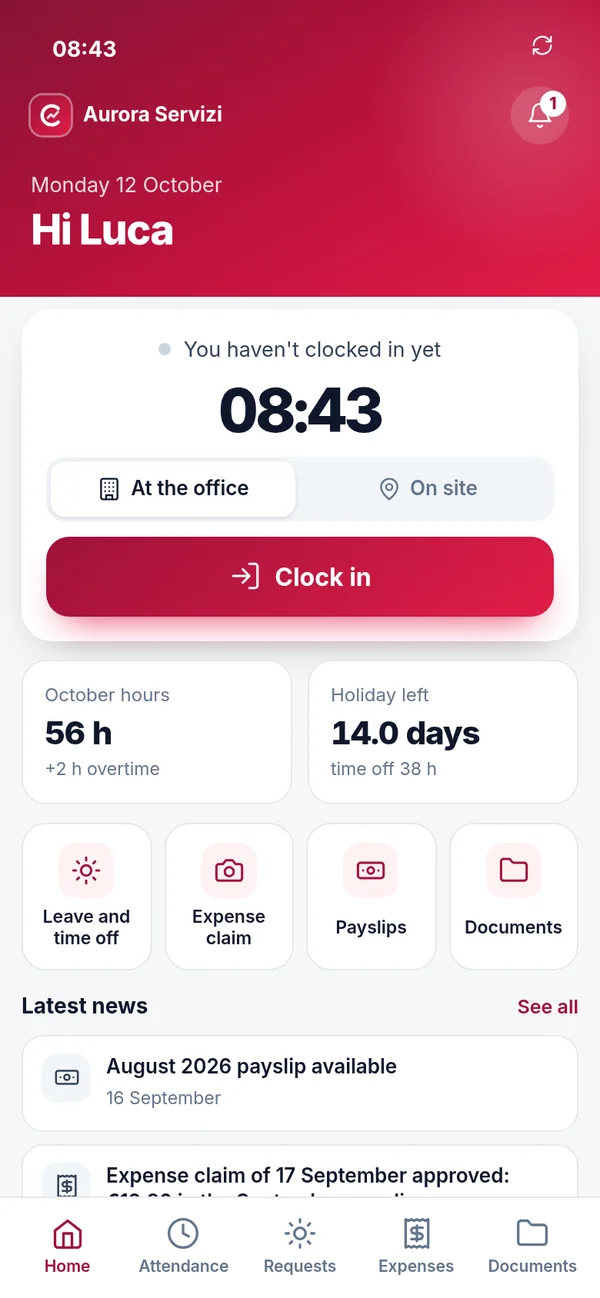
An app on their phone, with nothing to install, for everyday tasks.
Accounting
Every document creates its own entries: the invoice goes into the payment schedule, the bank transfer closes the item, and the journal and VAT build up as you go. The screenshots come from the demo and use fictional data: click to enlarge them.
Dashboard
Cash in the bank, overdue receivables and payables, VAT due, revenue for the month. And a 90-day cash forecast that lines up expected receipts, supplier payments, F24 tax payments, salaries and the thirteenth-month bonus.
Sales invoices and SDI
Choose the customer: recipient code, payment terms, VAT rate and cost centre come from their record. Lines are picked from the price list and totals update as you type. Then one click sends the invoice to SDI.
Purchase invoices and journal
Invoices received through SDI appear ready to record, with account, cost centre and due date suggested from previous entries. Withholding tax and professional pension contributions on freelancers' invoices are already split out.
Banking and reconciliation
Transactions are downloaded from the bank, and for each one Nixsa Conti suggests a match: the invoice with the same amount and customer, two invoices paid together, a payment on account, a fee to post to bank charges.
Payment schedule and reminders
Customer receivables and supplier payables in a single payment schedule, with days overdue and a history of reminders. Each reminder goes out with the text already written and a list of the customer's open invoices.
VAT, cost centres and your accountant
The periodic VAT settlement builds itself from issued invoices and recorded purchases, with the F24 form ready to schedule. Profit and loss shows revenue, costs and margin for every cost centre. And the package for your accountant goes out in a single send.
The full cycle
In the demo you can run through both cycles with the guided tour: five steps, three roles, and data that genuinely updates.
HR
The HR manager sees who is in today, approves requests and expense claims, keeps track of mandatory medicals and training, and prepares the month for the payroll consultant.
Employee records and deadlines
Contract, national collective agreement (CCNL) and grade, working hours, cost centre, leave and time-off balances, documents. The HR deadline list sends timely reminders for medical checks, safety training and fixed-term contracts.
Attendance and clock-ins
Clock-ins from the app, and from a badge reader if needed, become hours worked, overtime, leave, time off and sick days in a single calendar. Anomalies stand out and are resolved with one click.
Leave and time off
Requests arrive from the app with the balance before and after, and the department's cover on the days requested. Approve, or decline with a reason, and the employee knows straight away.
Expense claims
The employee photographs the receipt: amount, date and merchant are read from the photo; they check them, choose the category and customer, and submit. The manager approves with the receipt in view, and the reimbursement goes into the next payslip.
Payroll data
Regular hours, overtime, leave, time off, sick leave with certificate numbers, business travel and reimbursements for every employee, in the format agreed with your consultant's firm. Any anomalies must be resolved before sending.
Nixsa Conti does not calculate payslips: your payroll consultant does, working from data that has already been checked instead of spreadsheets to retype.
Employee app
It opens in the browser and can be added to the home screen. A few large buttons for everyday tasks, designed with people working on site in mind.
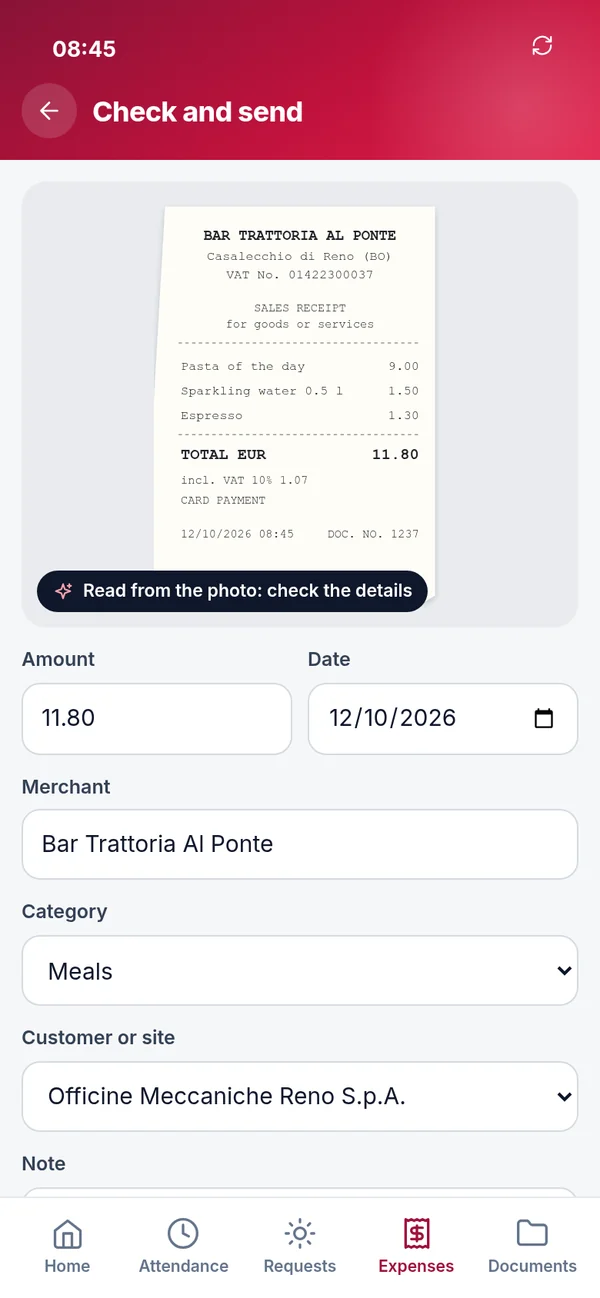
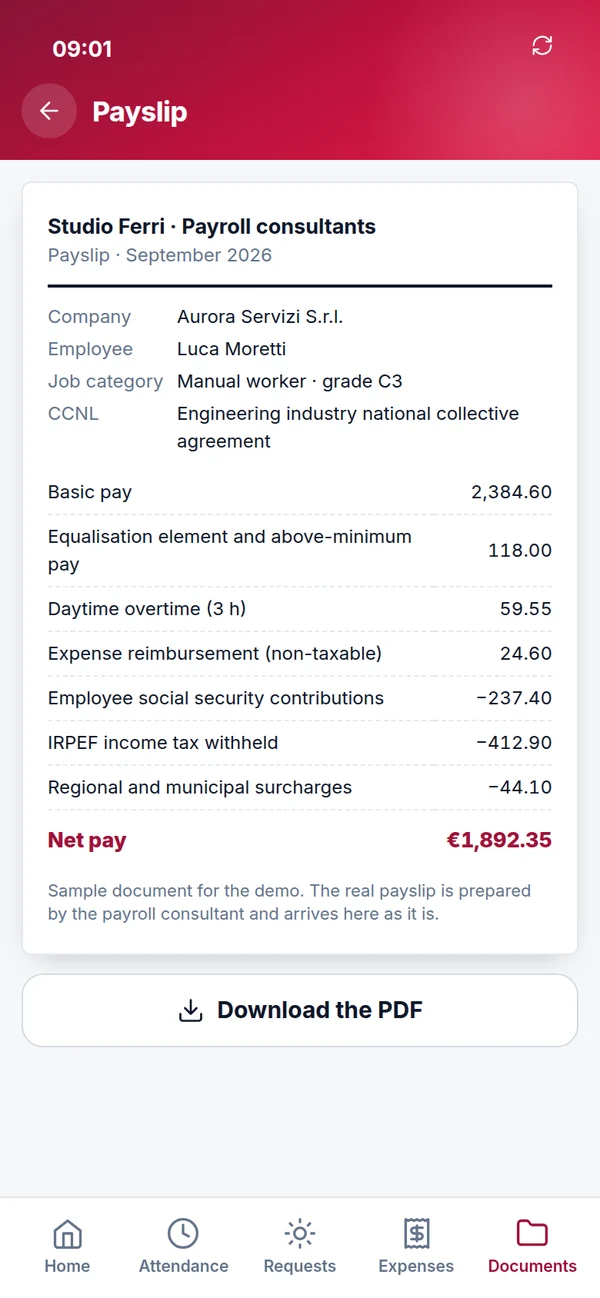
Leave approved, expenses reimbursed, payslip available: one notification, with the details in the app.
Payslips, the annual tax certificate (CU), contract, training certificates and company notices with read confirmation.
Employees see only their own data: attendance, balances, requests and documents.
Configured for your company
The demo shows a services company with four cost centres. Nixsa Conti is configured around yours and can be tailored extensively, from the chart of accounts to the links with the outside firms that support you.
Your accountant's own, with their codes and transaction types.
Departments, sites, jobs or service lines, with the allocation rules you choose.
Accounts linked via open banking, or imported bank statements (CBI, CAMT.053).
A monthly package in the format the firm uses: XML, CSV, PDF or a file layout for its own software.
Attendance file layout agreed with the firm, with payslips and the LUL sent back.
Working hours, shifts, absence types, overtime and approval rules by department.
Who sees what and who approves what, role by role and person by person.
Customer and supplier records, balances, open items and employees imported at go-live.
Who it's for
Nixsa Conti is designed for companies operating in Italy with an in-house administration team, staff to manage, and an accountant and a payroll consultant who should receive well-organised data.
Services, installation, maintenance, retail, manufacturing: companies with dozens of people, several cost centres and plenty of invoices every month.
Engineering, legal, medical and multi-partner practices with high invoice volumes, staff and freelance associates, who want to see profitability by area.
Service and social cooperatives with many worker-members, shift patterns, attendance to check and services to report on contract by contract.
Who uses it every day
Getting started
We agree the timeline together, once we understand how you work today and which firms you work with.
We show you the demo using your own cases: the invoices you issue, the banks you use, and how you handle attendance and expense claims today.
We gather your chart of accounts, cost centres, employment contracts, approval rules and the formats used by your accountant and payroll consultant.
We set up roles and permissions, connect your banks and SDI, and import customer and supplier records, balances, open items and employees.
We train your administration team and managers, open the app to employees and work through the first month-end closes with you.
Frequently asked questions
No. It keeps day-to-day accounting in order inside the company: invoices, banking, payment deadlines, journal, VAT and cost centres. Your accountant receives a complete, checked package every month and continues to handle the annual accounts, tax returns and any other compliance work you entrust to them.
No. It prepares and checks the month's data (attendance, overtime, absences, business travel and reimbursements) and passes it to your payroll consultant, who produces the payslips. When the firm sends them back, Nixsa Conti publishes them in each employee's app.
Through a transmission channel to SDI, which we set up during onboarding. Invoices you issue go out with one click and you can see the outcome; invoices you receive appear ready to record, with the data already read from the file.
Yes, through open banking services where your bank offers them; otherwise, statements can be imported in standard formats. Either way, transactions arrive with a suggested match.
No. The app opens in the phone's browser and can be added to the home screen. Everyone signs in with their own credentials and sees only their own data.
Try the demo
Aurora Servizi S.r.l. is a fictional company in Bologna with 40 employees. Choose a profile and go in: you can issue invoices, match payments, and request and approve leave. A reset button puts everything back to how it started.
Inside the demo you will find a five-step guided tour: from invoice to payment, and from leave request to payslip.
Tell us how you work today, which banks you use and which firms support you: we will prepare a walkthrough built around your case.